
AWS Organization Overview
An introduction to our AWS multi-account Organization Architecture.
When designing our AWS Organization Architecture, one of the core principles was reducing the blast radius. As we are working with a high degree of automation when setting up our infrastructure, we have to ensure that in case of any introduced errors, the blast radius is as limited as possible.
In AWS the most secure layer of isolation is an AWS account. One AWS account from another is treated like a complete separate customer. This is why we decided to go with a multi-account strategy, to also completely isolate our different environments and domains.
Organization Architecture
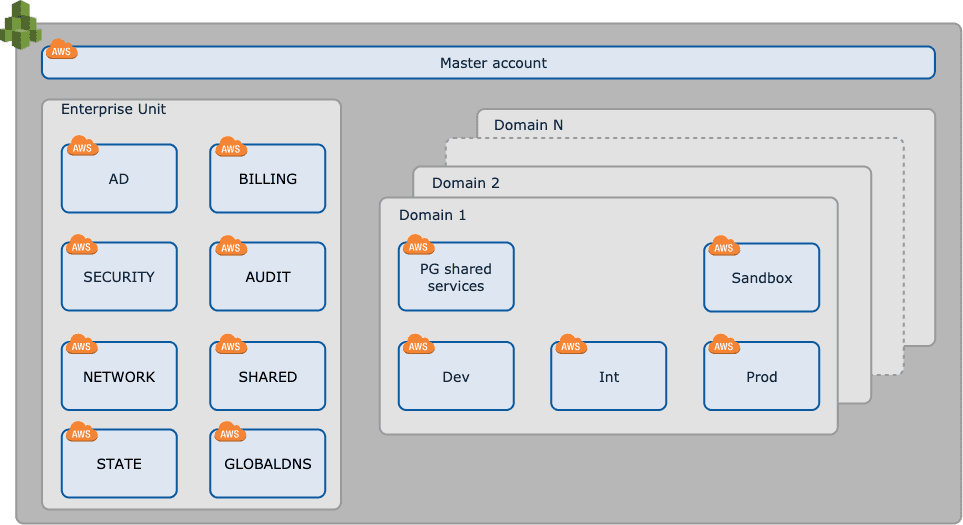
The AWS organization architecture is composed of:
- Master Account
- Enterprise Unit
- Architecture Domains
Master Account
The master account is the root of the organization. It is the only account that has access to the organization API.
The account is used to :
- Manage the whole organization
- Create, manage and setup the AWS accounts under the organization
- Create and manage Organizational Units (OUs)
- Create, manage and attach Service Control Policies (SCPs)
- Pay the organization bills
- Enable SSO
Enterprise Unit
The Enterprise Unit is an OU that holds all the AWS accounts that have a company-wide reach. For example, Cloudtrail logging is centralized, and aggregates Cloudtrail logs from all the organization's accounts, thus it has an account in the Enterprise Unit.
Currently, the Enterprise Unit contains these accounts:
- AUDIT: holds all the Cloudtrail logs from all the accounts in the organization
- BILLING: holds the billing data and reports
- SECURITY: holds security and compliance tools and used for pen testing
- NETWORK: Contains our Transit Gateway that interconnects our organization’s AWS accounts via VPN as well as VPNs to third parties
- SHARED: Runs services shared by all AWS accounts, like CI/CD master (Gitlab), Docker Registry ...
- STATE: Contains the Terraform State for all sub accounts
- GLOBALDNS: Contains the Hosted Zones for all our root domains, e.g. share-now.com. Zones are then delegated to other accounts
Architecture Domains
An Architecture Domain is an OU that holds all the AWS accounts of one of our architectural domains, e.g. fleetassets
or billing.
For more information on how these domains are organized, you can take a look at our Architecture Principles.
A recent list of Domains can be found in Confluence or directly in our git source repo.
Currently, an Architecture Domain contains these accounts:
- DEV: for development workloads
- INT: for integration testing and workloads
- QA: optional for specific QA testing
- PROD: for production workloads
- SHARED: runs the services shared by the accounts of the Product Group, like Gitlab Runners
- SANDBOX: account without enforcement of infrastructure as code to create quick PoCs. Is cleaned-up every weekend
See also Platform Access on more information on how to gain access to your accounts.