
CDNs & WAF - Content Delivery Networks and Web Application Firewall
CDNs
A CDN or Content delivery network lets us expose public endpoints, providing high availability and security features such as Web Application Firewalls.
All internet-facing HTTP-based webpage/views and APIs have to made available through one of our Content Delivery Networks (CDN).
List of Available CDNs
The following CDNs are the most common way to expose your application publicly:
| Name | URI | Purpose | Consumer | Client | URL pattern webpage | URL pattern API | AuthN / AuthZ | Authentication |
|---|---|---|---|---|---|---|---|---|
| WEB | share-now.com | For all our customer-facing web applications and their APIs e.g. SHARE-NOW or SHARE-NOW Pass microsite accessed through a web browser | Customer | browser | www.share-now.com/ | APIs:www.share-now.com/api/$domain/$apiWeb-Views: www.share-now.com/$domain/$api | Customer Keycloak | OAuth with JWT using KeyCloak Basic Auth |
| APP | app.share-now.com, app.free2move.com | For all our customer-facing webviews and API accessed through our mobile apps | Customer | mobile apps | app.share-now.com/$domain/$webview | app.share-now.com/api/$domain/$api | Customer Keycloak | OAuth with JWT using KeyCloak Basic Auth |
| ADMIN | admin.share-now.com, admin.free2move.com | For all internally used web applications and API e.g. Backoffice, VLM, FMM | Business user | browser | admin.share-now.com/$domain/$webview | admin.share-now.com/api/domain/$api/<version>/<endpoint> | Operator Keycloak | OAuth with JWT using KeyCloak Okta Authentication (integration environment only) |
| PARTNER | partner.share-now.com | Central entrypoint for our PartnerAPI, single purpose to have one API for all partners (see: Share Now Partner API ) | Technical user | partner application | partner.share-now.com/api/$domain/$api | Partner Keycloak | OIDC Client Credentials Flow using KeyCloak | |
| EXTERNAL | external.share-now.com | For all API endpoints provided to external partners, multi-purposes e.g. VehicleList API, Bosch | Technical user | external application | external.share-now.com/api/$domain/$api | External Keycloak | OAuth Browser flow with JWT using KeyCloak (Keycloak Modules & Architecture ) Other authentication, up to domain (e.g. Basic Auth) | |
| Generic | *.eks-eu-central-1-cdn.STAGE.DOMAIN.carloop.dev | For all other endpoints which cannot be assigned to a known cdn example: a new endpoint cannot be assigned to "app" cdn for a design purpose" | Tehnical user | browser-mobile apps | '*.eks-eu-central-1-cdn.dev.platform.carloop.dev/$domain |
The full list of custom CDNs can be found in the related Gitlab group
Expose your service behind CDN with platform/base-chart
Exposing your service behind the CDN is as simple as that
Generic CDN
As a best security practice Generic CDN can be used to expose "other" endpoints which required to be publicly accessible and might not fit to be behind one of the available cdn due to architecture design.
Example of DNS name structure for the generic CDN would be like: release-name.eks-eu-central-1-cdn.dev.platform.carloop.dev.
You can use the new generic CDN as the replacement for the current public endpoints.
Our platform base chart is supporting exposing your application behind the generic cdn, you can check the example Here
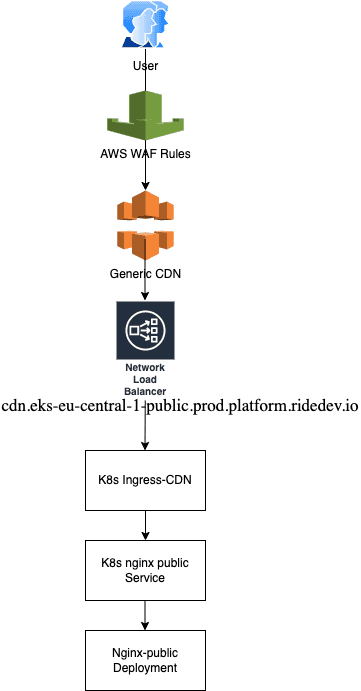
Generic CDN Routing Flow
Cookie Best Practices
To avoid conflicting or leaking cookies between applications running in the same CDN ( e.g. admin.share-now.com) the PATH attribute (https://developer.mozilla.org/en-US/docs/Web/HTTP/Cookies) should be set to the specific path of the application. This avoids that the cookie is sent to other applications.
Local Storage Best Practices
To avoid conflicting local storage key names between applications running in the same CDN (domain) e.g. admin.free2move.com the key name has to named on the following guideline:
_$domain_$app-prefix$keyname e.g. _fleetops_fmmUserLanguage
Bypassing Okta Authentication via Proxy
Okta SSO can be bypassed for automated testing by using our proxy servers:
HTTP_PROXY=http://proxy.shared.carloop.dev:3128 HTTPS_PROXY=http://proxy.shared.carloop.dev:3128 curl http://admin.int.free2move.com/backoffice/ -L
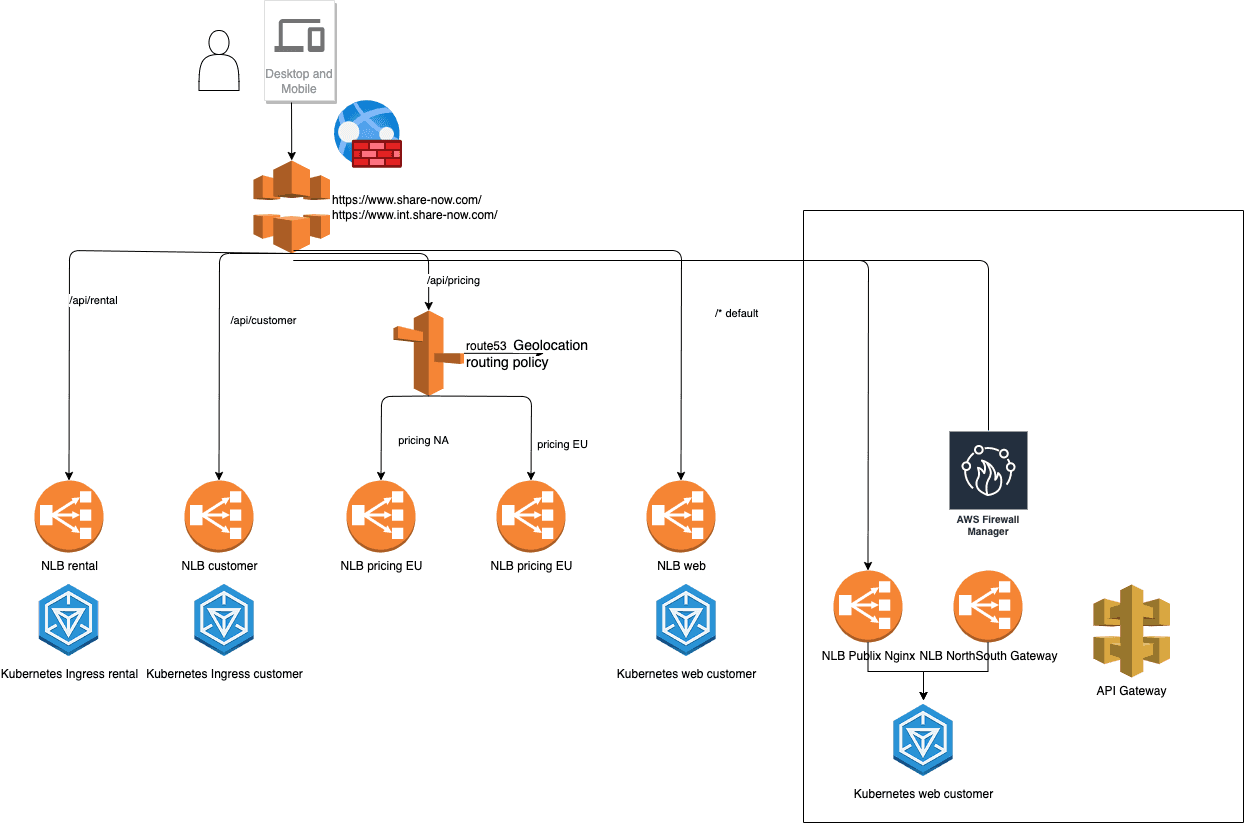
Network Routing Flow
Web Application Firewall (WAF)
A Web Application Firewall or WAF protects our organization against web exploits and bots that may compromise security.
Web ACLs
You use a web access control list (ACL) to protect a set of AWS resources. You create a web ACL and define its protection strategy by adding rules. Rules define criteria for inspecting web requests and specify how to handle requests that match the criteria. You set a default action for the web ACL that indicates whether to block or allow through those requests that pass the rules inspections.
Rules
Each rule contains a statement that defines the inspection criteria, and an action to take if a web request meets the criteria. When a web request meets the criteria, that's a match. You can configure rules to block matching requests, allow them through, count them, or run CAPTCHA controls against them.
Rules groups
You can use rules individually or in reusable rule groups. AWS Managed Rules and AWS Marketplace sellers provide managed rule groups for your use. You can also define your own rule groups.
Monitoring
WAF and CDN logs are available in Loki for the different stages:
Adding an exception
So you realised one of your service was not reachable behind the CDN, then you checked the WAF Dashboard and found the
WAF_RULE_BlockRuleID that blocks the traffic for a specific endpoint of your service.
Now go on the repository of your cdn (platform/cdn- in gitlab) and open a Merge Request to add an exception.
Further documentation in regard to WAF and Exceptions can be found here and there